v1 showed what was possible. v2 showed what the team built. v3 is about making it last: using AI safely now that it can act for you, and measuring our progress every month so we keep getting better.
Since v2, almost everyone with a seat is using Claude, and three out of four people use Cowork, which reads your files, works in your browser and finishes tasks on its own. That is where the time savings come from. It also means a mistake can now do something, not just say something. v3 adds the two habits that keep this working as we grow: stay secure and keep measuring.
Copy what works from colleagues. Real, local cases moved more people than any training. Keep sharing them.
Cowork in the cloud, Google connectors, how to use AI responsibly, clear rules for using agents safely, and a monthly usage report with an engagement score for every member.
AI prepares, gathers, drafts and checks. You decide, and you own the outcome, including anything an agent does under your name.
Sixteen more seats than v2, and 73 of 79 people used Claude in September, on four days a week on average. That is 286 messages per active person. Claude is now part of the working week for almost the whole office.
Share of people using each way of working, from the 30 days to 22 September.
Cowork overtook Chat: 73% of people now use Cowork (65% in v2), ahead of Chat at 69%. People are moving from asking questions to handing over whole tasks, which is exactly the shift v1 and v2 asked for.
Twelve people still only use Chat, and Cowork sessions slipped 8% from v2 (4,854 vs 5,255) even with more seats. Those twelve are the fastest win for October.
Two upgrades since v2 change how much you can hand over. Cowork can now run in the cloud and follow you across devices, and the company has switched on connectors so Claude can work directly in Gmail, Calendar, Drive and Sheets.
Claude can only reach files on your computer, or use your browser, while the desktop app is open there.
| Connector | What Claude can do |
|---|---|
| Gmail | Search and read mail, draft replies, send with your approval |
| Google Calendar | Check availability, create and update events |
| Google Drive | Find and read Docs, Sheets, Slides and PDFs |
| Docs, Sheets, Slides | Create and edit files live, beside the chat |
Turn them on: in a chat or Cowork task, click + › Connectors, switch on the ones you need and sign in with your Mister Mobile Google account.
"Find this week's supplier emails about stock arrivals and put model, quantity and ETA into a new Google Sheet."
"Look at my calendar for next week, find a 30 minute slot with the outlet managers, and draft the invite email for me to review."
"Read every SOP in this Drive folder, list where they contradict each other, and notify me on my phone when the summary is ready."
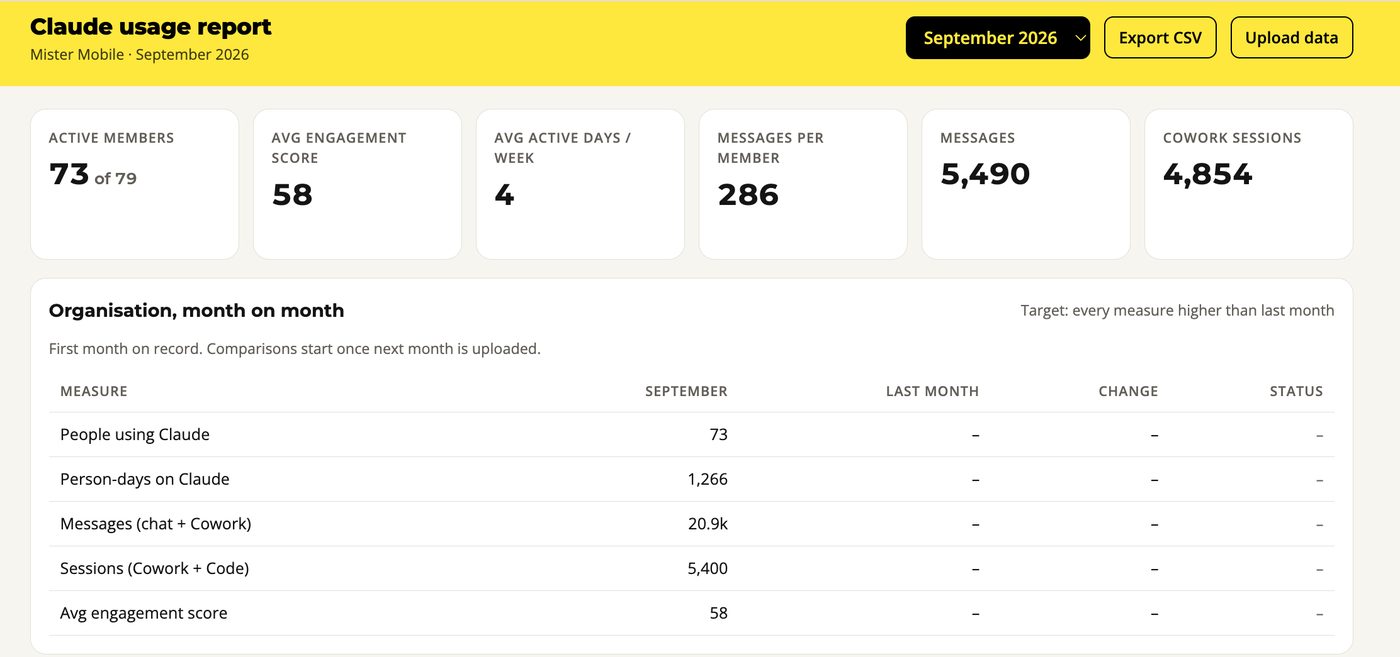
Management asked a simple question: are we using AI more each month? The usage report answers it. It is built from Claude's own analytics, updated on the 2nd working day of every month, and reviewed by HODs and management.
Every organisation measure higher than the month before: people using Claude, person-days, messages, sessions and the average engagement score.
One number per person that combines how often and how deeply you use Claude. Targets are fixed, so a higher score always means more real usage, not a better ranking against colleagues.
| Part | Weight | Full marks at (per month) |
|---|---|---|
| Active days | 35% | 24 days |
| Cowork and Code sessions Cowork counts as sessions or Cowork messages ÷ 3.2, whichever is higher, so long sessions count fairly | 35% | 300 sessions |
| Messages, chat and Cowork | 15% | 500 messages |
| Outputs: artifacts, projects, PRs, file edits | 15% | 15 outputs |
Points rise quickly at first and then level off, so getting started counts for a lot. Full marks means you are among our heaviest users.
Bands from the 30 days to 22 September. See the report for the latest.
Average score: 58. That is our baseline. Lifting the Light group into Regular is the single biggest lever, and most of them only need one real task moved into Cowork.
Claude can now read our emails, files and spreadsheets and act on them. That is what makes it so useful, and it is also why the person using it has to stay in charge. Think of Claude as a very fast new colleague: you would not send their work to a customer without reading it, and you would only show them what they need for the job.
Claude can sound sure and still be wrong. Before anything goes to a customer, a supplier or management, check the prices, stock, dates, policies and numbers against the real source, such as POS, WooCommerce or the SOP.
Most tasks do not need personal details. Remove names, phone numbers, NRIC, IMEI and card details before you paste something in, or refer to an order number instead. Passwords and API keys never go in.
Hiring, staff performance, refunds, pricing and anything legal: let Claude gather, compare and draft, then make the call yourself and be ready to explain it without saying "the AI said so".
No fake reviews or testimonials, no AI images of real staff or customers without their consent, and no copying a competitor's content. Anything public must still sound like Mister Mobile and be true.
| ✅ Do | ❌ Don't |
|---|---|
| "Summarise this complaint and draft a reply" with the customer's name and phone removed | Pasting the full customer record, contact details and all |
| Let Claude draft the quote, then check price and stock in POS before sending | Sending an AI quote straight to the customer |
| Use the Drive or Sheets connector on the folder the task needs | Downloading a full customer or staff list and uploading it to a chat |
| Ask Claude where a figure came from, then open that source | Copying numbers into a report because they look right |
| Use Claude to shortlist and summarise candidates, then interview and decide | Rejecting someone because Claude scored them low |
We are on Claude's Team plan, a business plan, so Anthropic does not use our chats or Cowork sessions to train its models by default. One exception: if you press thumbs up or down, that conversation may be used. Do not rate chats that contain company or customer information.
Would you be comfortable if the customer, your manager or the PDPC saw exactly what you gave Claude and what you did with the answer? If yes, go ahead. If not, take the personal details out or ask IT first.
A new colleague is helpful, fast and keen, and also easy to mislead. Agents read files, web pages and emails, and some of what they read can contain hidden instructions written to trick them. This is called prompt injection. Seven habits keep you safe.
Make a folder for the task and connect only that. Keep finance documents, staff records and anything with passwords out of connected folders.
Switch to Manually approve for sending messages or emails, deleting files, posting, paying or changing live systems. Never use Skip all approvals for work tasks.
If Claude opens sites or files you did not mention, changes topic, or asks for a password or customer details, stop the task, take a screenshot and tell IT.
Claude sees whatever is on screen. Do not open the side panel on banking, payroll, HR or payment pages, and close tabs you do not need before you start.
Each one widens what Claude can reach. Use the ones the company has switched on, such as Gmail, Calendar, Drive and Sheets, and ask before adding a new one. Read every email before you approve sending it.
Summaries and reports are fine. Do not schedule tasks that send messages, change records or touch sensitive files. Check past runs and delete tasks you no longer need.
Published pages and artifacts can be shared with anyone who has the link. Make sure there is no customer or staff data inside before you send one out.
If an action would be hard to undo, you press the button. If something looks off, stop and tell IT. Nobody gets in trouble for reporting.
Rules 1 to 5 carry over from v2. Rules 6 and 7 are new.
It is the one we have an agreement with, control access to, and can audit.
Request it. It goes on the approved list if the tool is data-safe, or the process keeps sensitive data away from it.
Remove customer and staff personal details, IMEI and payment details before using them with any AI tool. Passwords and API keys never go in.
Your own ChatGPT or Gemini login sends company data somewhere with no agreement and no record. That is a PDPA exposure. If you need something, ask.
Nothing is enabled by default. Ask IT for what your role needs.
Anything AI helped produce that goes to a customer, supplier or management is checked by you first: facts, prices, tone and data.
Anything Cowork or Claude in Chrome does under your account is your action. Approve anything you cannot undo, and stop and report anything that looks wrong.
Ask your HOD which band you are in, then do the one thing below.
Pick one task you repeat every week. Make a folder for it, connect it to Cowork, and describe the task the way you would brief a new colleague. Ask a Champion in your team to sit with you for fifteen minutes.
Use Claude on more days of the week, not just bigger days. Move one chat habit into Cowork so the work is done for you, not just described.
Turn your best workflow into something others can reuse, a skill, a project or a template, and teach one colleague. Send it in as a case for v4.
Check AI work before it leaves your hands, take personal details out before you paste, give Cowork one folder, and approve anything you cannot undo.